Wednesday, July 18, 2012

Change the MAC Address of your NIC .


The following guide will show you how to correctly change your Network Card’s MAC Address using the Windows Registry. Below are several different methods to accomplishing this and I am sure that one will work for you. These methods can be used in both Windows Vista and Windows 7; I have not yet tested them in the Windows 8 environment.


Method One:


1. Access your network connection properties and select the configure option. 
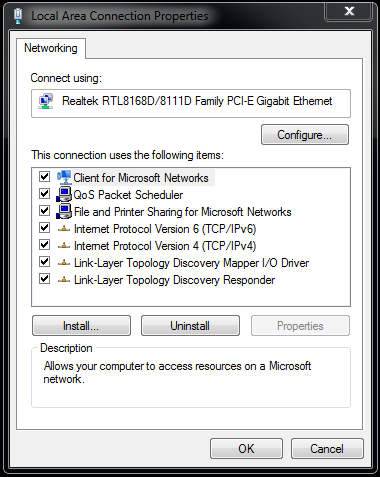

2. Select the Advanced Tab and then select Network Address. From here you need change the Value to custom and enter your desired MAC Address. Remember that this can only be twelve numbers in length.

Download Microsoft Office 2013,Customer's preview for free

Microsoft  has unveiled the customer preview of the new Microsoft Office, optimised for the Windows 8 and touch-based devices like tablets. The next release features an intuitive design that works beautifully with touch, stylus, mouse or keyboard across new Windows devices, including tablets.


Microsoft Office 2013 responds to touch as naturally as it does to keyboard and mouse. Swipe your finger across the screen or pinch and zoom to read your documents and presentations. Author new content and access features with the touch of a finger. You can use a stylus to create content, take notes and access features. Handwrite email responses and convert them automatically to text. Use your stylus as a laser pointer when presenting.

Hack & Password Cracking with GPUs, Part III: Tune Your Attack

You've built the hardware, installed the software and cracked some passwords. Now find out how to fine-tune your attacks.
In the first two parts of this series, I explained what hardware to get and then described how to use the hashcat software suite to perform dictionary and brute-force attacks. If you have been following along, by this point, you should have had plenty of time to build your own password-cracking hardware and experiment with oclhashcat. As I mentioned in my last column, password cracking is a pretty dense subject. In this article, I finish the series by describing how to tune and refine your attacks further so they can be more effective.

Use More GPU Cycles

The first area where you can fine-tune your attacks is to put more or less load on your GPU. The -n option, when passed to oclhashcat, changes how much of your GPU will be used for an attack. The documentation says that this value is set to 80 by default; however, on my computer, it seemed like the default was set closer to 40. When I first ran a brute-force attack, the output told me I was using around 70–80% of my GPU. Once I added -n 80 to my oclhashcat command, I noticed I was using between 96–98% of my GPU and had added an extra 40,000 comparisons per second:

Hack & Password Cracking with GPUs, Part II: Get Cracking

Your hardware is ready. Now, let's load up some software and get cracking.
In Part I of this series, I explained how password cracking works in general terms and described my specific password-cracking hardware. In this article, I dig into the software side of things and describe how to put that hardware to use cracking passwords. I also discuss the two main types of attacks: dictionary and brute-force attacks. As I describe each attack, I also give specific examples of how I used the software to attack phpass, the hashing algorithm currently used for PHP-based software like WordPress.

For the purposes of this article, I created a sample WordPress blog on my server and created a few custom accounts—some with weak passwords and others with truly random passwords. Then, I went into the database for the site and pulled out the phpass password hashes for each account and put them into a file that looked like this:

Hack & Password Cracking with GPUs, Part I: the Setup

When the Bitcoin mining craze hit its peak, I felt the tug to join this new community and make some easy money. I wasn't drawn only by the money; the concepts behind Bitcoin mining intrigued me, in particular the new use of graphics processors (GPUs). With a moderately expensive video card, you could bring in enough money to pay off your initial investment and your electricity bill in a relatively short time.
Then Bitcoin tanked. That's okay though, because I hadn't gotten around to building my mining rig yet, and what's more, I found an even more interesting use for Bitcoin mining hardware: password cracking. Bitcoin mining and password cracking are quite similar operations, and a GPU can crack passwords much faster than a CPU or even a small cluster of CPUs. In this two-part article, I explain how to set up and use a password-cracking computer. In this first piece, I focus on the principles behind password cracking and the overall hardware setup. I'll cover the specific attacks and command-line examples in the following article.

Hide your entire Hard Drive.


What do you do when loads of data on your computer needs to be cleverly hidden away from inquisitive family members or office colleagues? Software such as folder lockers, encryption utilities and others do a decent job, but is a costly method and leaves traces. We will show you a simple trick with which you can hide your data easily from others. This trick is very simple works against casual snoopers, but will not prevent a skilled spy from finding it! To do it, all you need is a separate partition to store all the data you want to hide.

Step 1: Create an additional partition and format it. Windows Vista and 7 users can use the Shrink Space option from the Disk Management Utility to create a new volume without repartitioning the hard drive. Windows XP or

How to build Your Own File Server.

Build yourself a secure file server using any old computer with a couple of hard drives and store all your data centrally.


Every office that generates large amounts of data needs a file server so that users can access it all from a central location. The sole purpose of a file server is to provide the users on the network with files. Additionally, file servers can also provide data to other users over the internet via a website or FTP service. A file server is nothing but a simple computer with ample storage space, running a server operating system and configured with data backup or synchronizing software. The hardware is usually designed using special purpose processors, RAM, motherboards, hard drives, power supply units and cabinets so the server is able to be powered on 24x7. So they have to be rugged and efficiently cooled too.